I got this question twice last month, both times from owners about ten days out from drywall. “How many network drops do I need?” One of them had a number from his GC. It was eight. He opened with 22 devices that needed a cable.
So let me walk through how we actually count restaurant network drops on a job, because the method matters more than whatever number I could throw at you here. If you don’t know what a drop is yet, read the restaurant network cabling guide first. Short version: a drop is one cable, from the rack to one jack on a wall, and one device plugs into it.
A rough number, if you need one today
Full-service restaurant with a bar: 15 to 30. Fast-casual with a counter and a small kitchen: 10 to 15. Big multi-room place with a patio and a private dining room, 40 isn’t unusual. I’ve done 60.
Those are sanity checks, nothing more. If your count comes out at 9 for a 4,000 square foot place with a bar, something got missed.
Counting restaurant network drops room by room
Get the floor plan from your architect. If there isn’t one yet, draw it on a legal pad, it doesn’t need to be pretty. Then walk the space (or the drawing) and write down every single thing that will plug into a network cable. Will. Not might.
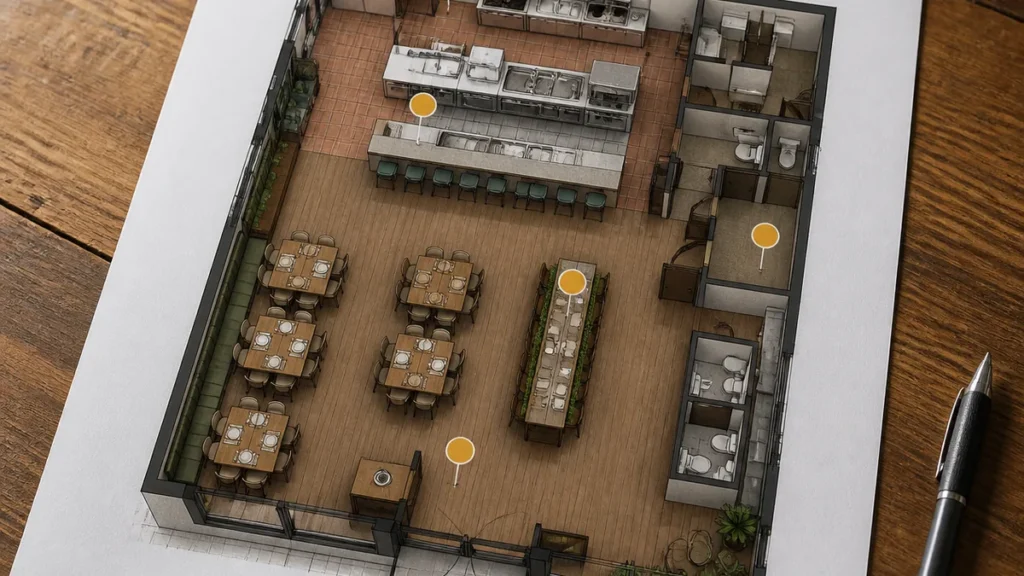
Front of house
Every POS terminal gets its own drop. I’ll say that again because it’s the thing people push back on: every terminal, its own cable. Toast actually spells this out in their site readiness guide, one run from the switch to each terminal, printer, KDS and access point, Cat5e minimum. We don’t pull Cat5e anymore; it’s Cat6 on every job and sometimes 6A, and here’s the reasoning on Cat6 vs Cat6A if you want it.
So, front of house: a drop per terminal, a drop per receipt printer that isn’t bolted to a terminal, one for a kiosk if you’re doing that, and one at the host stand. The host stand one gets skipped constantly. “It’s just an iPad for reservations.” Sure. And in eight months it’s running a terminal because the Friday line backs up to the door.
The bar
Bars eat drops. Two terminals is normal, three if it’s a long bar with a service well at each end. A receipt printer. Usually a kitchen printer too, because bar food tends to fire separately. And if the TVs are going to stream off a box on the network instead of a cable receiver, that’s one per TV.
The other thing about bars: the top is granite or walnut or some butcher block the owner picked out personally, and nobody wants to drill it twice. Get the holes right the first time. Toast wants a 2 to 3 inch hole within two feet of each terminal.
The kitchen
This is where I’d rather you over-count than under-count. Kitchen walls get skinned in stainless and FRP, and fishing a cable behind that after the fact is a bad afternoon for everyone involved.
Each KDS screen is a drop. Expo, grill, fry, sauté, salad, whatever stations you’re running. Kitchen printers, one each. And put a drop at expo even if you’re not planning a screen there, because you will be.
Terminate kitchen drops in surface-mount boxes, not flush plates, and keep them out of the direct line of the hood. Heat and grease kill jacks.
Access points
Handhelds (Toast Go and the like) run on WiFi, so no cable to the device. But every access point they talk to needs a wired, PoE drop back to the switch. How many APs you need is a coverage question and I wrote about that separately in what restaurant WiFi actually needs. One AP almost never covers a whole restaurant. The patio pretty much always needs its own.
Count a drop per AP, then add one extra in the dining room ceiling. APs get moved after opening more than anything else we install.
Everything else
Office: two drops at least. There’s always a second computer eventually, or a printer, or a safe that phones home.
Cameras: one per camera. The camera guy may not have picked spots yet. Call him. Get a number before the ceiling closes.
Music: if the audio system has a network streamer or controller, that’s a drop at the rack or at the amp.
Patio: one for the outdoor AP, one more if you’ll ring up out there.
Drive-thru or pickup window: terminal plus confirmation screen.
Menu boards: one per screen, or one per media player if a few screens share one.
Then add 20 percent
Take your total and add a fifth. Round up.
I know. But every restaurant we’ve cabled has moved something within the first year. The expo window shifts. A second bar printer shows up. The owner decides month three that the patio needs a real terminal. Each of those is a two-minute pull before drywall, or a technician on a ladder next to your line during prep after. We don’t put prices in these articles but this piece on what drives cabling cost will give you a feel for why the after-the-fact version costs so much more.
Spare drops also kill the “we’ll just put that on WiFi” conversation. WiFi is for handhelds and guests. Printers and terminals go on copper. Anything that has to work at 7:30 on a Friday goes on copper.
Stuff that goes wrong on Houston jobs specifically
Long runs. The commercial cabling standard, ANSI/TIA-568, limits a horizontal run to 90 meters, call it 295 feet, and Toast says the same thing in plain English: under 300 feet or add a switch closer to the device. In a long skinny strip-center bay, or one of those converted warehouses in EaDo, a rack at the back wall can put the host stand out of range without anyone noticing until the terminal starts dropping. That’s when a small second switch up front earns its keep.
No slack. Leave six to ten feet coiled behind every jack. Terminals move during install. A cable cut dead to length is a cable you’re re-terminating.
No labels. Same label on both ends of every cable. POS1, POS2, KDS-GRILL, AP-DINING. Feels like overkill until a terminal dies mid-service and somebody’s tracing cable by hand with a flashlight.
Guest junk on the POS network. The POS lives on its own VLAN. Your iPad, your phone, the Sonos, none of it goes on the same network as the card readers. That’s part of every Toast POS network install we do, and Toast will tell you the same.
Home runs that land nowhere. Every run terminates on a patch panel in a rack. Not zip-tied behind the modem on a shelf above the ice machine. I’ve seen that one more than once.
What to hand your contractor
Three things: the floor plan, your device list by room, and where the rack is going. With that, any decent low-voltage contractor can count drops, flag anything out of range, and tell you whether you need a second switch.
That’s how every commercial cabling job we do starts. If you’d rather hand it off, send the plan over through the contact page or call (832) 338-4939 and we’ll come back with a count and a rack location, usually inside a couple of days.
A few questions we get
What counts as a network drop?
One cable from the rack or switch to one jack at a device. A terminal, a printer, an access point, each one is a drop.
Can two devices share a drop?
Technically, with a little switch at the far end. For POS gear, don’t. One bad cable should only take down one thing.
Do KDS screens really need a cable?
Yes. Toast and basically every other POS vendor require KDS, kitchen printers and receipt printers to be hardwired. Handhelds are the only thing designed to live on WiFi.
How many spares?
About 20 percent over your device count, and make sure at least one lands in the kitchen, one at the bar, and one in the dining room ceiling.